Beyond Generic AI Voices: How to Create Authentic Podcast Host Personalities
Discover how to create unique, authentic podcast hosts with custom names, personalities, speaking styles, and tone controls. Move beyond robotic AI voices to engaging conversations.
Voice customization in AI podcasts goes far beyond choosing a voice — it lets you define each host's personality, speaking style, and emotional range to create shows that sound distinctly yours. The problem with most AI-generated podcasts is that they all sound the same: same generic hosts, same robotic conversations, same bland delivery. If AI podcasting is going to be more than a novelty, creators need real creative control over their show's personality and voice.
DIALØGUE was built specifically to solve this problem. Deep customization isn't an afterthought — it's the core of the platform. For a broader overview of how AI podcasts work end-to-end, see our complete guide to AI podcast generation.
Why Do Most AI Podcasts Sound Generic?
You've probably heard one: two AI voices having a stilted conversation about a topic, with no personality, no style, and nothing memorable. They sound like customer service bots reading a Wikipedia article to each other.
That's not a limitation of the technology. It's a limitation of platforms that don't give creators control.
The difference between a forgettable AI podcast and one that builds an audience is the same as the difference between a corporate training video and a podcast you actually want to listen to: personality.
The 6 Personality Fields: Building Your Hosts
DIALØGUE gives you six distinct fields to define each podcast host. These aren't cosmetic — they fundamentally change how the AI writes dialogue, arguments, reactions, and conclusions.
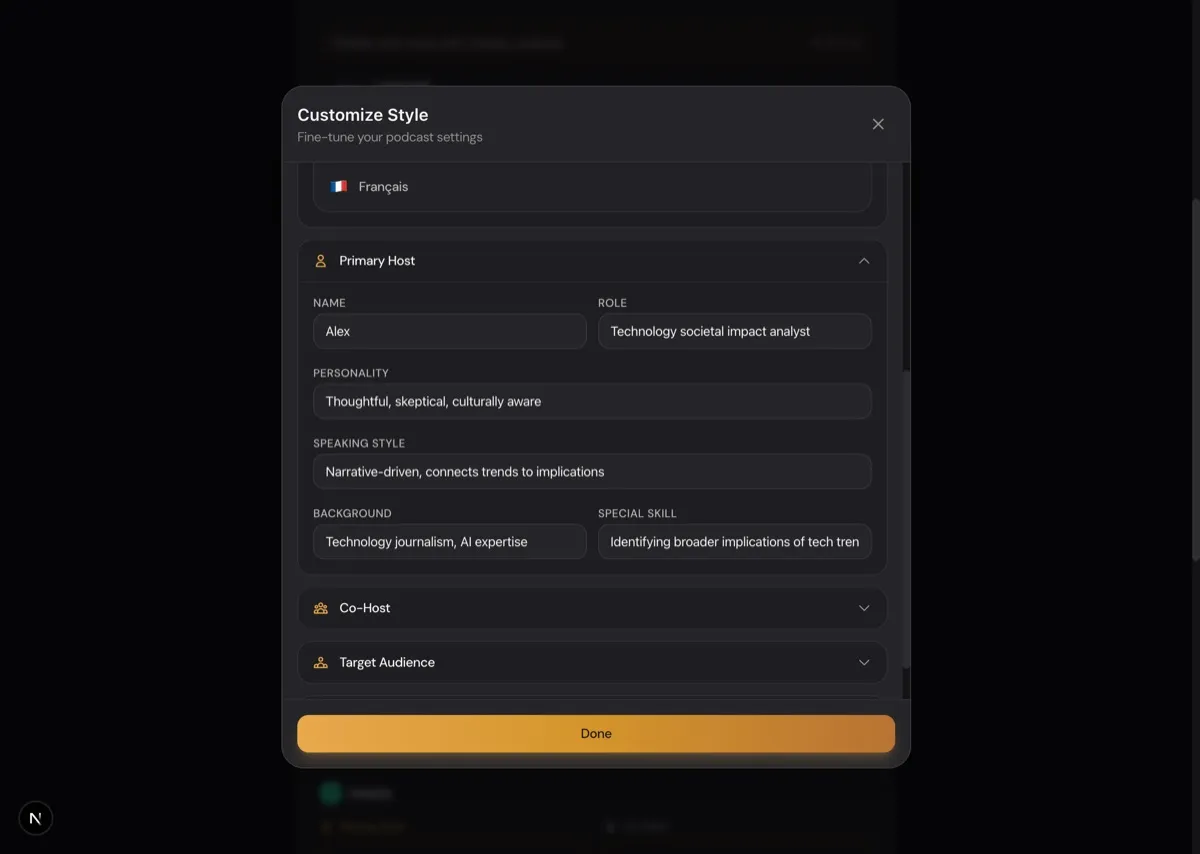
Name
Your host's name shapes how they're referenced throughout the episode and sets the tone for the show. "Dr. Sarah Chen" signals something different from "Tech Mike" or "Alex."
Role
This defines the host's function in the conversation. Examples:
- "Senior tech analyst with 10 years covering AI companies"
- "Curious skeptic who asks tough questions"
- "Enthusiastic storyteller who breaks down complex topics"
The role determines what perspective they bring and how they interact with the other host.
Personality
This is where you define the character. Examples:
- "Analytical, detail-oriented, sometimes pedantic but always well-informed"
- "Energetic and curious, loves finding surprising connections between ideas"
- "Calm and measured, prioritizes clarity over cleverness"
The personality field directly influences the host's tone, word choice, and reactions throughout the script.
Speaking Style
How does this host actually talk?
- "Uses short, punchy sentences. Lots of questions. Direct."
- "Speaks in longer, flowing thoughts with rich vocabulary"
- "Casual and conversational with occasional humor"
Speaking style controls sentence structure, vocabulary level, and rhetorical patterns.
Background
The host's expertise and experience:
- "Former software engineer, now full-time AI safety researcher"
- "Business journalist who covered three tech bubbles"
- "Philosophy major who got obsessed with AI ethics"
Background determines what knowledge the host can reference, what analogies they use, and what they find interesting.
Special Skill
What unique value does this host bring?
- "Explains technical concepts with everyday analogies"
- "Connects current events to historical patterns"
- "Challenges assumptions with contrarian viewpoints"
This field ensures each host has a distinct contribution to the conversation, avoiding redundancy.
Tone Sliders: Fine-Tuning the Vibe
Beyond personality fields, DIALØGUE gives you three tone sliders that control the overall feel of your show.
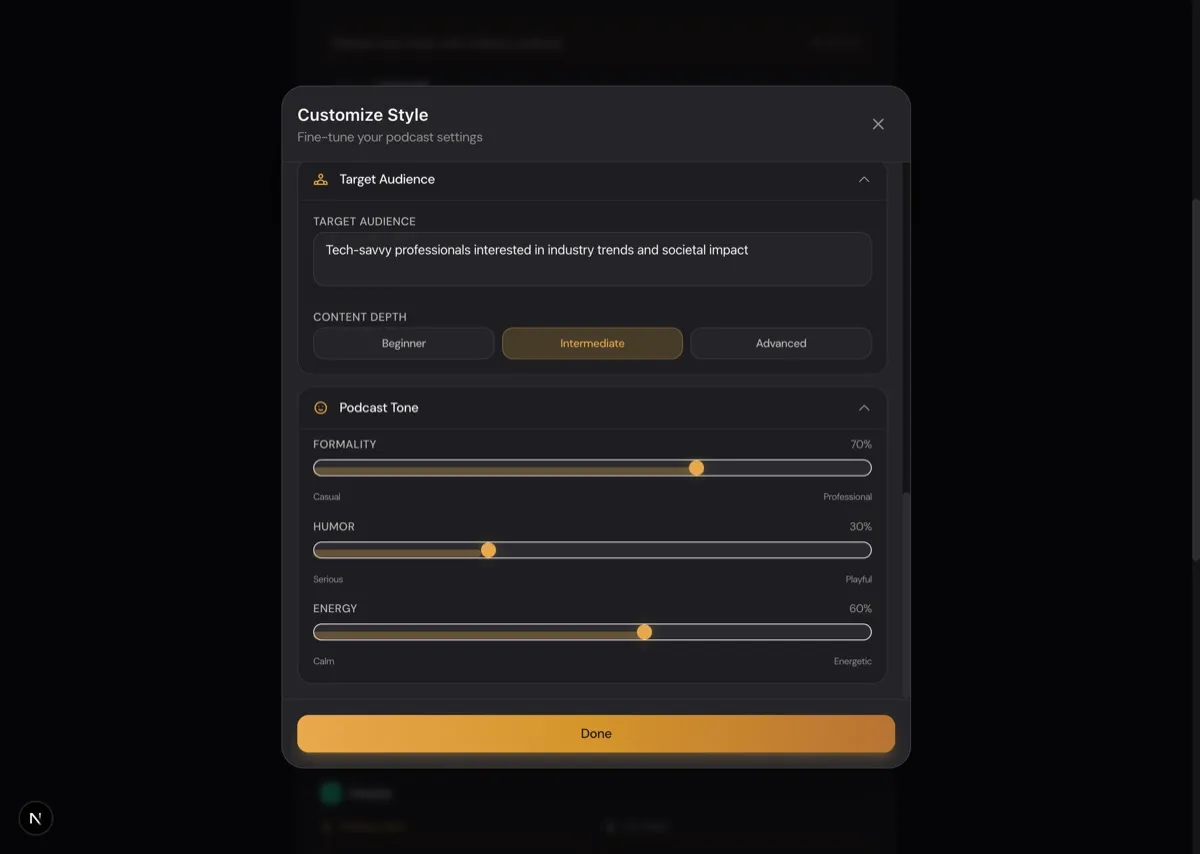
Formality (Casual ↔ Professional)
- 30-40%: Conversational language, contractions, casual phrasing
- 50-60%: Balanced tone suitable for most topics
- 80-90%: Professional language, formal structure, precise terminology
Humor (Serious ↔ Playful)
- 10-20%: Mostly serious with occasional light moments
- 40-50%: Balanced — informative but engaging
- 70-80%: Frequent humor, jokes, and playful banter
Energy (Calm ↔ Energetic)
- 20-30%: Measured, contemplative pace
- 50-60%: Moderate energy with natural variation
- 80-90%: Fast-paced, enthusiastic, dynamic
Different combinations create completely different show feels. A tech news show with 30% formality, 60% humor, and 80% energy feels nothing like a business analysis show with 90% formality, 10% humor, and 40% energy.
Tone Settings by Show Type
| Show Type | Formality | Humor | Energy | Result |
|---|---|---|---|---|
| Tech News | 30% | 60% | 80% | Lively, approachable, fast-paced |
| Business Analysis | 90% | 10% | 40% | Serious, precise, measured |
| Educational | 50% | 40% | 50% | Balanced, clear, patient |
| Storytelling | 50% | 30% | 50% | Narrative-driven, emotionally varied |
| Debate | 70% | 20% | 70% | Structured, assertive, dynamic |
| Science Explainer | 60% | 30% | 60% | Curious, accurate, engaging |
For more on how templates pre-configure these settings, see our podcast templates guide.
Hear the difference customization makes. Create a free podcast and experiment with all 279 voices and personality settings.
Audience Targeting: Shaping the Content
Two additional controls determine how the AI approaches your topic:
Target Audience
A free-text field where you describe who's listening:
- "Software developers curious about AI but not ML experts"
- "Business executives who need to understand blockchain without technical jargon"
- "Science enthusiasts with undergraduate-level background knowledge"
This shapes what the hosts assume their audience knows and what needs explanation.
Content Depth
Three levels control how thoroughly the AI explores the topic:
- Beginner: High-level overview, lots of explanations, accessible analogies
- Intermediate: Balanced detail with some assumed knowledge
- Advanced: Deep dives, technical accuracy, nuanced discussion
8 Specialized Templates: Pre-Configured Starting Points
Each of DIALØGUE's eight templates comes with pre-configured host personalities and tone settings optimized for that format:
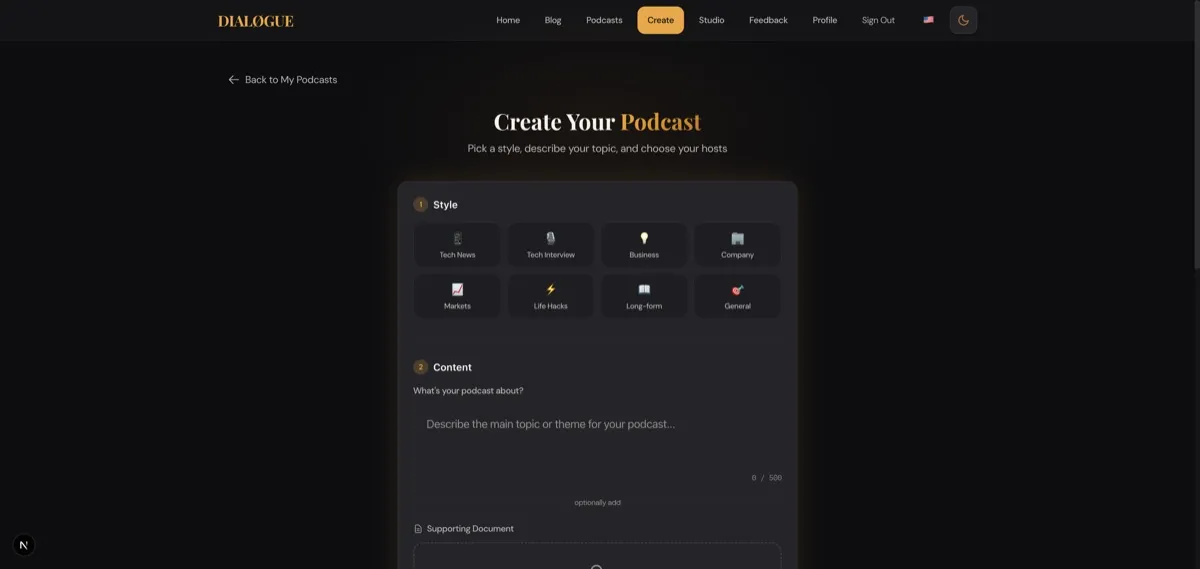
- Tech News — High energy, moderate humor, current events focus
- Business Analysis — Professional tone, analytical hosts, data-driven
- Educational — Clear explanations, patient pacing, beginner-friendly
- Storytelling — Narrative structure, emotional range, character-driven
- Interview Style — Conversational, question-based, guest-focused
- Debate — Contrasting viewpoints, structured arguments, respectful disagreement
- Company Analysis — Business-focused, financial literacy, strategic thinking
- Science Explainer — Accuracy-first, analogies for complex topics, curiosity-driven
You can start with a template and customize from there, or build your hosts from scratch.
How Do You Choose the Right AI Voice for Your Podcast?
Voice selection complements personality design. DIALØGUE offers 279 ElevenLabs voices with different characteristics:
- Warm and friendly
- Authoritative and professional
- Energetic and dynamic
- Calm and measured
The key is matching the voice to your host's personality. An energetic, playful host personality paired with a monotone voice creates cognitive dissonance. A professional, serious host needs a voice that matches that gravitas.
Practical Examples
Let's look at how different configurations create different shows:
Example 1: Casual Tech Podcast
Hosts:
- "Sam" — Energetic tech enthusiast, asks questions, curious about everything
- "Jordan" — Senior developer, explains concepts with analogies, patient teacher
Tone Settings:
- Formality: 30% (very casual)
- Humor: 60% (playful but informative)
- Energy: 80% (fast-paced, enthusiastic)
Audience: "Developers who want to stay current on AI trends"
Result: A lively, approachable conversation about technical topics without being condescending or overly formal.
Example 2: Professional Business Analysis
Hosts:
- "Dr. Chen" — Former hedge fund analyst, data-driven, skeptical of hype
- "Marcus" — Business journalist, connects market trends to broader economic forces
Tone Settings:
- Formality: 90% (professional language)
- Humor: 10% (mostly serious)
- Energy: 40% (measured, thoughtful pace)
Audience: "C-suite executives making strategic decisions"
Result: A serious, well-researched analysis of business trends with minimal filler and maximum insight density.
Example 3: Storytelling Show
Hosts:
- "Riley" — Narrative-focused, loves connecting ideas to human stories
- "Taylor" — Detail-oriented researcher, brings historical context
Tone Settings:
- Formality: 50% (accessible but polished)
- Humor: 30% (occasional lightness)
- Energy: 50% (natural variation, emotional range)
Audience: "Curious listeners who love learning through stories"
Result: A narrative-driven exploration of topics that balances entertainment and education.
Why This Level of Customization Matters
Generic AI podcasts fail because they're interchangeable. There's no reason to come back to a show that sounds like every other show.
But when you craft hosts with distinct personalities, speaking styles, and perspectives — when you tune the tone to match your content and audience — you create something unique. Something listeners remember. This is especially important when building a branded podcast strategy that represents your company or personal brand.
The technology enables speed and scale. The customization creates quality and differentiation.
That's the point of DIALØGUE: giving creators the tools to build shows that sound like their shows, not just another AI podcast. And with Studio show workflows, you can maintain these custom voice settings across all your episodes for consistent branding.
Ready to create your uniquely styled podcast? Start customizing your hosts and discover what your show sounds like.
Written by
Chandler NguyenAd exec turned AI builder. Full-stack engineer behind DIALØGUE and other production AI platforms. 18 years in tech, 4 books, still learning.
Related Articles


Ready to create your own podcast?
Turn any topic or document into a professional podcast — with outline and script review before audio.
Create a Podcast